Publishing
Publishing turns your draft into a release and points live traffic at it. This page covers the release model, the difference between a test preview and a live publish, the four stages a publish moves through and where errors surface, the Releases popover, and rolling back.
You publish from the editor. The editor’s Releases popover is where you publish, roll back, and read your live status.
Draft vs releases
Your work lives in a draft — the set of files behind the editor, autosaved as you type. Publishing (or previewing) turns that draft into a release.
A release is a locked snapshot of your funnel. It doesn’t change after it’s made, so what you published is exactly what every visitor gets — releases never drift. Publishing the same unchanged draft again just reuses the release you already have.
Test preview vs live publish
There are two things you can do with a draft, and they’re not the same operation.
Preview serves your funnel in test mode — test-mode payments, and traffic that never reaches your analytics. Test isn’t a separate release; it’s a way of running one, so a preview never affects what’s live.
Publish promotes your draft to live. From that moment, new visitors get the new release.
| Action | Environment | Recompiles? |
|---|---|---|
| Editor Preview | Test | Yes (instant when unchanged) |
| Editor Publish | Live | Yes |
| Roll back | Live | No — switches instantly |
The four stages of a publish
A publish moves through four stages, each shown with its status and a message if it fails:
Preparing
Gathers your funnel’s latest saved source. Fails here only if there’s nothing to publish yet — save a draft first.
Building
Compiles your funnel. Compile errors surface here with the exact error, so a syntax mistake or a bad import is named rather than hidden.
Uploading
Stores the finished release.
Going live
For a live publish only: runs the go-live checks and switches live traffic to the new release. This is where the offering checks fire — an offer with no live price, or a page pointing at an offer that isn’t set up, is caught here (see Offerings & Catalog).
Where errors surface
In the editor you’ll see problems three ways:
- In the preview — while it recompiles you’ll see Updating preview…; on failure, a Preview error panel with the exact error and a copy button.
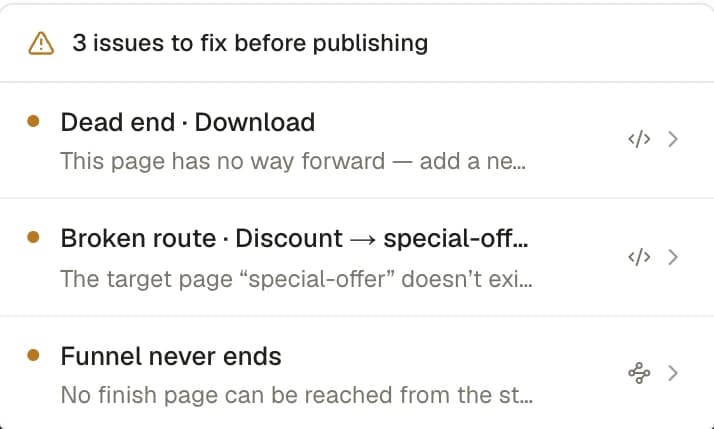
- Issues chip — an amber N issues to fix before publishing popover, each item deep-linking to Code or Flow:
- Dead end · <Page> — “This page has no way forward…”
- Unreachable · <Page> — nothing routes to it.
- Broken route · <From> → <to> — “The target page … doesn’t exist.”
- No email-capture step — “Add one so you can identify and re-engage users.”
- The release chip in the top bar, whose second half is your save state: Saving… / Save failed / Unsaved / Saved.
The Releases popover
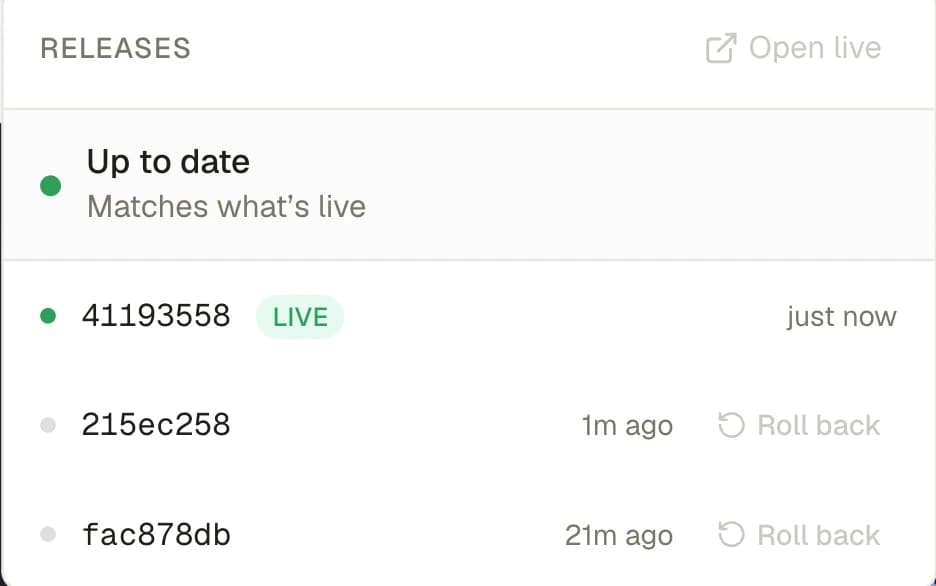
The top-bar pill is your live-status readout and the entry to releases. It reads as two halves — where your draft stands, then how it’s saved:
- Live — the draft matches what’s published (Up to date / “Matches what’s live”).
- Draft — the draft differs from what’s published, or nothing is published yet. Hover for which: the tooltip names the live release and adds unpublished changes, or says
Not published yet.
After the dot comes the save state: Saved 2m ago / Unsaved / Saving… / Save failed. So a published funnel you’ve just edited reads Draft · Unsaved, and one you haven’t touched since publishing reads Live · Saved.
Clicking it opens Releases: the draft row shows Unpublished changes with a Publish button (or Up to date when clean), and below it your releases — the current one wearing a Live pill, others revealing Roll back on hover. An empty history reads No releases yet. Publish to create your first release.
Rolling back
Hover an older release and hit Roll back. It takes effect for new visitors only — anyone mid-funnel finishes on the release they started on. Nothing is lost, and you can roll forward again just as easily; switching between releases is instant.
Running experiments hold their pages in place
A running experiment owns its variant pages, so live traffic never hits a broken split. While a test is running or paused, every page that backs one of its arms is held in place — in your draft and in each release you publish. A publish that would drop one of those pages is blocked: A running test is missing its pages. You don’t reconcile anything; you conclude the test (promote a winner or discard it) and the pages are yours to change again. See Experiments.
Instant first paint
Funnels are ad destinations — the cold click lands on the start page, and first paint has to be instant. So Appfunnel serves your start page as ready-made HTML, one version per language, with no loading flash. Deeper pages load as the visitor moves through the flow. The result: the first screen a visitor sees paints immediately, without you configuring anything.
Publish and preview are separate operations on the same draft. Preview all you want in test — it never touches what’s live, your analytics, or real money. Only Publish moves live traffic.