Connected Agents
You can pair a terminal coding agent — Claude Code, Cursor, Codex, or any MCP-capable client — directly to a funnel in the editor. Once paired, the agent reads and writes the same draft files you see, watches the preview rebuild, takes screenshots to verify its work, and drives the funnel’s navigation — all while your editor tab stays open and every change runs under your session.
This is the same funnel and the same draft as the in-browser editor. A connected agent is just another way in. What it can’t do — deliberately — is publish.
What Connect Agent is
Connect Agent is a relay. Three parties are involved: your editor browser tab, a lightweight hub on Appfunnel’s API, and your local agent. Your agent speaks MCP to the hub; the hub relays tool calls to your browser tab; your browser tab executes them under your admin session and relays the result back.
The important consequence: the hub holds no credentials. It’s a dumb pipe. Every file write, every screenshot, every navigation runs in your browser, as you. The agent never gets your login — it gets a pairing code that lets it borrow the open tab.
Pairing, step by step
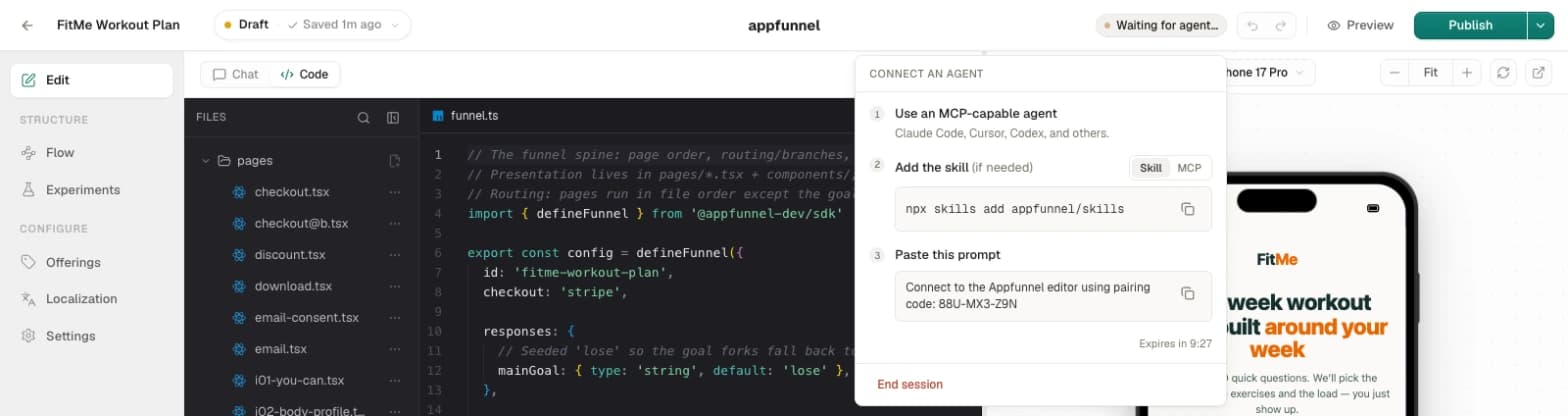
Click the Connect agent pill
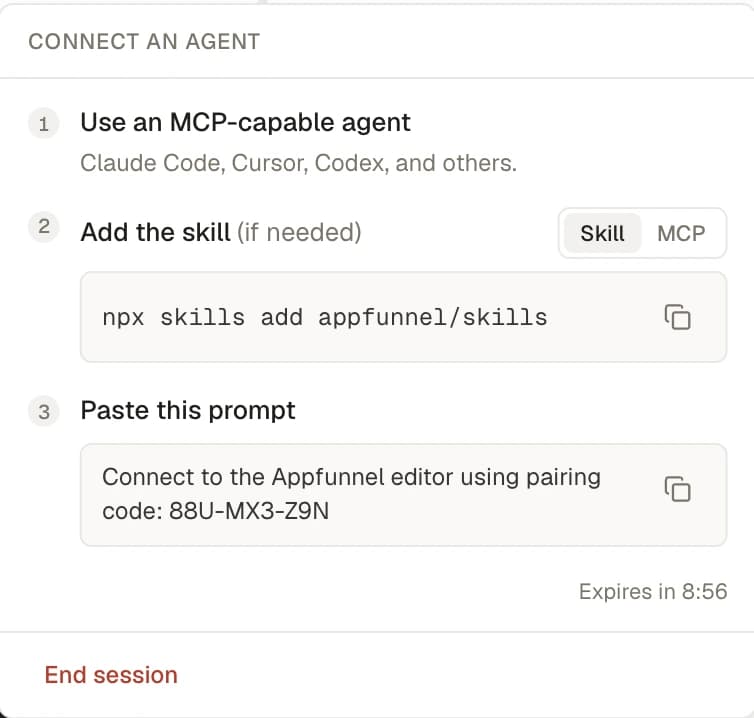
In the editor top bar, click Connect agent (tooltip: “Connect an MCP-capable agent to this funnel”). A popover opens, headed CONNECT AN AGENT, with three steps.
Step 1 — Use an MCP-capable agent
The popover’s first line: “Use an MCP-capable agent” — “Claude Code, Cursor, Codex, and others.” You need one of these set up locally.
Step 2 — Set up the connection (Skill or MCP)
A Skill | MCP toggle picks how your agent connects. It defaults to Skill.
Skill (Claude Code, easiest) — install the Appfunnel editor skill once:
npx skills add appfunnel/skillsMCP (per client) — register the editor’s MCP endpoint. It’s a streamable-HTTP server at a single, session-independent URL: https://api.appfunnel.net/v2/editor-mcp.
- Claude Code:
claude mcp add --scope local --transport http appfunnel-editor "https://api.appfunnel.net/v2/editor-mcp" - Codex:
codex mcp add appfunnel-editor https://api.appfunnel.net/v2/editor-mcp - Cursor — add to
.cursor/mcp.json:{ "mcpServers": { "appfunnel-editor": { "url": "https://api.appfunnel.net/v2/editor-mcp" } } } - Other clients — register a remote MCP server named
appfunnel-editorover HTTP (streamable) with the bare URL above. No auth header is needed; the connection is unauthenticated until you pair.
Step 3 — Paste the prompt with the pairing code
The popover shows a large pairing code in the shape xxx-xxx-xxx. Paste the matching prompt into your agent:
- Skill:
Connect to the Appfunnel editor using pairing code: <code> - MCP:
Connect to the appfunnel-editor MCP with pairing code: <code>
The agent calls its one pre-pairing tool, connect_editor_session, with the code. On success the code is consumed and the editor’s full tool set appears in the agent.
npx skills add appfunnel/skills pulls the editor skill from the public
appfunnel/skills package. It’s the one external piece in this flow —
everything else is served by the Appfunnel API.
Code lifetime and session lifetime
Two clocks matter, and they’re different:
- The pairing code is short-lived and single-use. It lasts 10 minutes and works exactly once. The popover shows a live countdown — Expires in m:ss — and once it lapses gives you Generate new code with the note “Codes last 10 minutes for security.” If your agent reports an expired or unrecognized code, generate a fresh one and paste it again.
- The session lasts 24 hours. Once paired, the working session stays open for a full day (with a short grace window to survive a browser reconnect). You don’t re-pair for every task within that window.
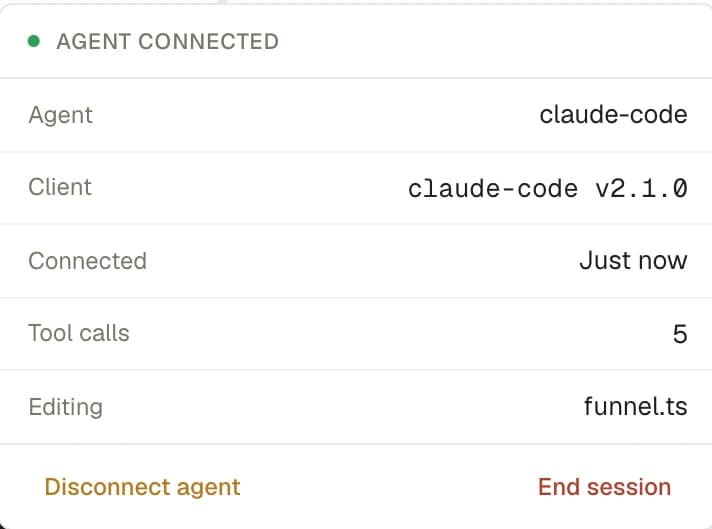
Once an agent pairs, the popover becomes a connected panel headed AGENT CONNECTED, showing the agent, client, connection time, tool-call count, and what it’s currently editing. The top-bar pill tracks the state too — Connect agent → Waiting for agent… (or Code expired) → <AgentName> · <toolCallCount> once live.
What the agent can do — the tools
After pairing, the agent gets get_editor_status, disconnect_editor_session, and 18 editor tools that execute in your browser. Grouped by what they touch:
Read
get_basic_info— funnel, project, pages, offerings, locales, current page, preview mode, live/draft status.list_files— the draft’s file list.read_file— one file’s contents.get_selection— what’s currently selected in the editor.
Write
write_file— replace a whole file (one at a time). Same path as a manual edit — the preview rebuilds and autosave runs.delete_file— remove a file.rename_file— rename a file.
Save
save_draft— flush the draft. Does NOT publish.
Reference
search_sdk— search the SDK’s real API (signatures and examples) so the agent writes code that actually exists.
Errors
get_errors— the current compile and render errors from the preview.
Screenshot
get_screenshot— a PNG of the preview (optionally a specific page, optionally full-page).
Navigation
get_navigation— where the preview is in the flow.go_to_page— jump to a page.go_next/go_previous— step forward or back.
Locale & device
set_locale— switch the preview to one of the funnel’s locales.set_device— render the preview in a specific device preset.set_preview_mode— toggle device/full framing.
Agent writes take the identical path as your own edits: the preview rebuilds and autosave fires. The same guards apply, too — delete_file and rename_file refuse a page that backs a running experiment arm (the experiment owns that page until you conclude the test), and assets/* are upload-only, so write_file can’t set a binary.
What agents cannot do
Agents cannot publish. There is no publish tool, on purpose. save_draft’s own contract says it “Does NOT publish (publishing stays a human action).” An agent can build your funnel out completely — pages, copy, styling, translations, an A/B variant — and save it, but promoting it to live is always something you do yourself from the Releases popover, the CLI, or the dashboard.
This is the boundary that makes agents safe to hand a funnel to: they author your draft, you ship it. Review the result in the preview, then publish.
Disconnect vs End session
Two ways to stop, with different meanings:
- Disconnect agent (tooltip: “Frees the seat · session stays open · new code issued”) — unbinds the current agent but keeps the session alive and mints a fresh pairing code. The agent’s tools revert to connect-only. Use this to hand the session to a different agent, or when an agent is done but you want to keep working. After it, the panel reads “Agent disconnected — share a new code to reconnect.”
- End session — tears the whole session down. It’s a two-step action (it arms to Confirm end? before it fires), and both sides get notified. Use it when you’re finished. Sessions also end on their own after 24 hours, and can end because a newer session replaced this one, or because the agent ended it from its side.
The security model, plainly
A connected agent can do a lot — it edits your funnel’s files — so it’s worth being clear about exactly what that power is and isn’t:
- The agent acts through your browser session. Every tool executes in your open editor tab, under your admin login. The agent doesn’t hold your credentials; the hub relaying its calls doesn’t either. Nothing runs server-side on your behalf.
- The tools only exist while your tab is open. If you close or navigate away from the editor tab, the agent’s tools error until it reconnects (there’s a short grace window). Close the tab for good and the agent can do nothing.
- Pairing is the auth. The pairing code is a single-use, 10-minute capability. There’s no long-lived token to leak. The session itself expires in 24 hours.
- Kill switches are yours. Disconnect agent frees the current agent instantly; End session kills everything. Both are one click (End is two-step). You’re never locked into a connection.
- Agents can’t forge analytics or publish. No tool emits tracking events, and no tool publishes.
In short: a connected agent borrows your open editor tab for as long as you let it, edits the same draft you’d edit by hand, and can’t do the one irreversible thing — go live — without you.