Custom Domains
A published release isn’t live traffic yet. To serve real visitors your funnel must be reachable at a custom domain you own, behind an active campaign. This page is the go-live model: how domains serve, how to attach and verify one, how campaigns route to your funnels, and the exact URL a visitor hits.
A custom domain is required to serve a funnel — outside the preview
link, your funnel only goes live on a domain you own and have verified.
There’s no shared *.appfunnel.net URL to fall back on, so set up a domain
before you plan to launch.
Attach and verify a domain
Custom domains are a project setting. Open Settings → Domains:
Serve your funnels on your own branded domains. Campaign links work on every verified domain.
Hit Add domain and enter the hostname (placeholder quiz.yourbrand.com). Appfunnel creates the record; you then point DNS at it.
Each domain in the list wears one of two status badges:
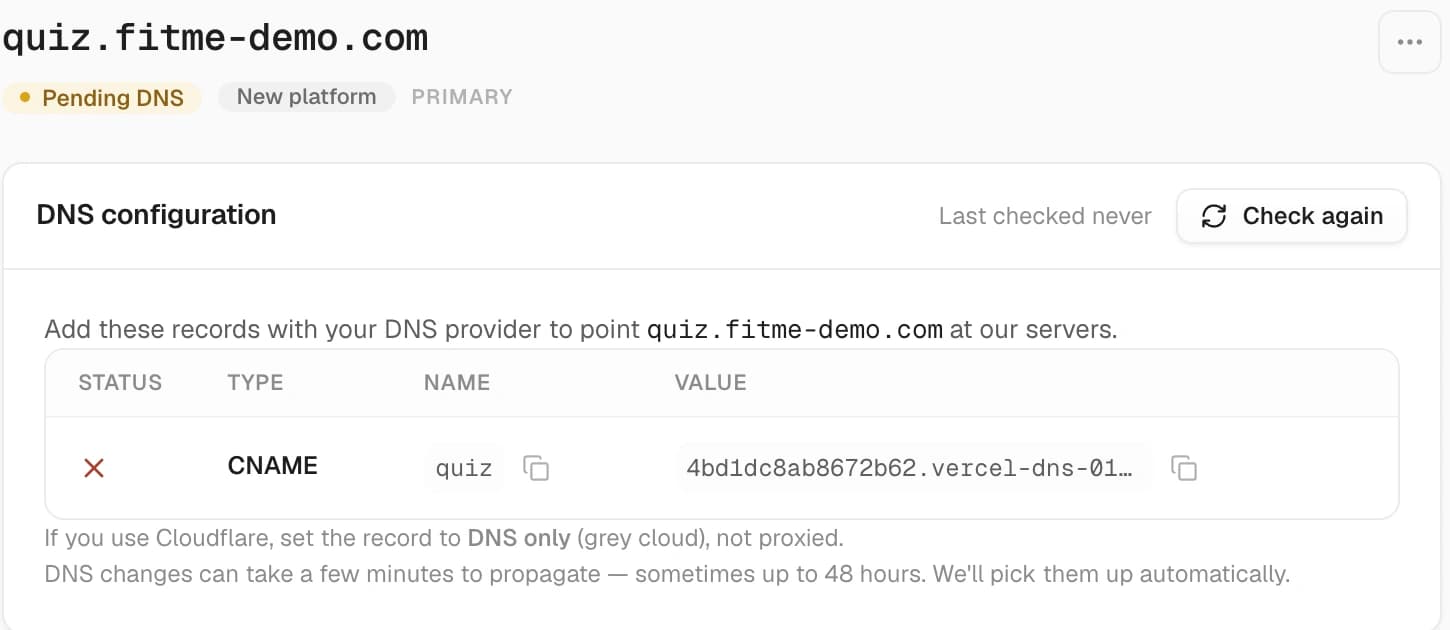
- Pending DNS (amber) — the records aren’t in place yet. The row adds DNS records missing · last checked … and a Check again button.
- Active (green) — the records are found and the domain is serving.
Open a domain for its DNS configuration card: a table of exactly the records you need — Status · Type · Name · Value — with a copy button on every name and value. A record Appfunnel has found gets a green check; one it hasn’t gets a red ✗. Add them with your DNS provider, then hit Check again. Appfunnel also picks them up on its own.
“DNS changes can take a few minutes to propagate — sometimes up to 48 hours.” In practice it’s usually much faster, but a freshly-added record that doesn’t show up immediately isn’t broken. On Cloudflare, set the record to DNS only (grey cloud), not proxied. SSL is issued and renewed for you once DNS is configured — nothing to do.
Once every record is found, the card flips to Configured correctly · funnels are live at https://<your-domain>/<campaign> and folds the table behind a Show DNS records toggle.
At serve time, the incoming host must match a domain record that is verified. Anything else returns a 404 (covered in Troubleshooting). Domain records are per-project — a domain serves the campaigns and funnels of the project it’s attached to.
Campaigns
A campaign is the routing layer between a domain and a funnel. It owns a slug (the path visitors hit) and links to one or more funnels. Create one from the Campaigns page (New Campaign).
Slug rules
- The slug is unique per project.
- It cannot be a bare locale code (a 2–4-character string like
enorpt-br). A leading URL segment is used for language routing, so a locale-shaped slug would be ambiguous. Pick something descriptive:summer-quiz,sleep-plan.
Link a funnel
Link a published funnel to the campaign. A funnel can serve multiple campaigns, and a campaign can hold more than one funnel (when you’re testing one funnel against another). Re-linking the same funnel returns Funnel is already linked to this campaign.
Activate — the gotcha
A new campaign defaults to PAUSED, and a paused campaign 404s. Only an Active campaign serves traffic. Everything can be correct — domain verified, funnel published live, slots bound — and visitors still get a 404 until you activate the campaign. This is the single most common reason “my funnel is live but the URL doesn’t work.” Activate it explicitly.
The live URL
Once the domain is verified, the campaign is active, and the funnel is published, the funnel serves at:
https://<custom-domain>/<campaign-slug>With a page slug and a locale, the full shape is:
https://<custom-domain>/<campaign-slug>/<page-slug>
https://<custom-domain>/<locale>/<campaign-slug>/<page-slug>
The optional leading <locale> segment (e.g. /de/…) is how a specific language is served — this is why a campaign slug can’t itself be a locale code. Language can also be forced with ?language=de; see Localization for the full resolution order.
Ignore any older /f/<slug> URL shape you may see in stale UI copy — it’s outdated. The live shape is https://<custom-domain>/<campaign-slug>.
Go-live checklist
Before you share a link, confirm all four. A miss on any one produces a 404, and the 404 won’t tell you which:
Domain verified
Green status in Custom Domain settings.
Campaign active
Status is ACTIVE, not Paused — the most-missed step.
Funnel published live
The editor’s Releases pill reads Live (not Draft). See Publishing.
Slot bindings live
Every offering slot resolves to an offering with a live price — the same check that runs when you publish. See Offerings & Catalog.
Troubleshooting
The styled 404
An unverified domain, a paused campaign, an unpublished funnel, and a genuinely non-existent slug all return the same styled 404:
The page you’re looking for doesn’t exist or is no longer available
The 404 doesn’t tell you which of these it is — so when you hit one, diagnose it by walking the go-live checklist above rather than reading the error.
Propagation after publish or rollback
A publish or rollback takes effect for new visitors within about 10 seconds. If a just-published change or a just-activated campaign isn’t live yet, wait ~10 seconds and retry before assuming something’s wrong.