The Flow View
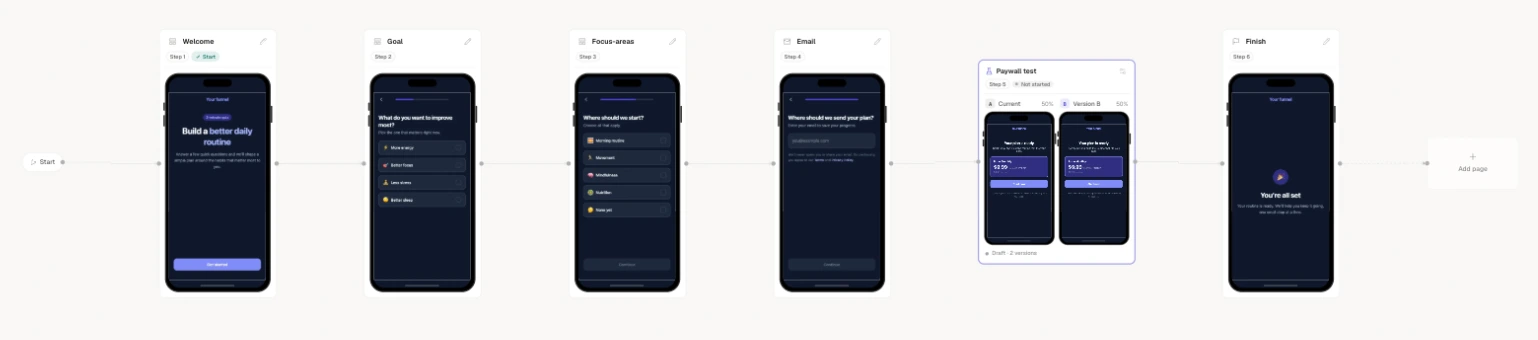
The Flow view is a visual map of your funnel. Every page is a node; every route between pages is an edge; every A/B test collapses into a single group node. It’s the fastest way to see the shape of a funnel — where a visitor can go, where they can get stuck — and to start a test on any page.
The graph is built from your funnel itself, so it’s always a true picture of how it actually runs — not a separate diagram you have to keep in sync.
Nodes and edges
- Page nodes carry a live thumbnail of the page so you can recognize it at a glance, plus its key and type.
- The Start node marks where visitors enter the funnel.
- Edges are the routes out of a page. When a route has a condition, the edge is labelled with it (for example
goal eq gain), so branching logic is visible on the canvas. A page with no explicit routes flows to the next page in file order.
Double-click a page node to jump straight to its file in the Code view — the canvas is a navigation surface, not just a diagram.
Validation decorations
Flow surfaces the same structural problems as the Issues chip, drawn right on the graph so you can see where they are:
- Dead ends — a page with no way forward.
- Unreachable pages — a node nothing routes to.
- Broken routes — an edge pointing at a page that doesn’t exist.
Seeing these on the map usually makes the fix obvious: a missing edge, a typo in a route target, a page you meant to link but didn’t.
Starting an A/B test
A test here is a page test: one page in the flow runs against alternatives while every other page stays exactly as it is. That’s the test you’ll reach for most.
Click a page node and the inspector opens on the right. Any page that isn’t already under test offers Start a test at the bottom of it. Clicking that starts a page test against that page — no modal:
Select the page and hit Start a test
The editor creates a variant page by copying the slot page into a sibling — pages/<slot>@b.tsx. A variant is a whole page, not a set of overrides.
A DRAFT experiment is created
A 50/50 experiment named “<Slot> test” is created in DRAFT state. Arm a is the control (your original slot page); b is the new sibling.
Two arms is just the starting point. While the experiment is a DRAFT you can add arms c and d — four in total, your control plus three challengers — and the weights rebalance as you go.
You land in the variant’s code
The editor opens the new variant page so you can make it different. It’s a real, editable, previewable page — Appfunnel discovers @-variant pages automatically.
Authoring the variant page is the only thing you do in the editor. Running and reading the test — weights, status, the verdict, promoting a winner — happens in the Experiments dashboard, not in funnel.ts. See Experiments.
Experiment group nodes
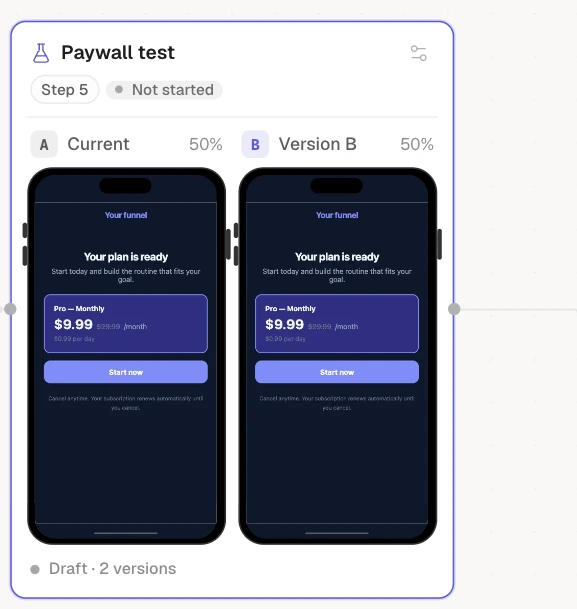
Once a page has variants, its node becomes an experiment group. The node carries a flask, the test’s name and status, and every version side by side — each a real thumbnail captioned Current / Version B / Version C with its traffic weight (50%, 50%, or however you’ve split it). The footer counts them: Running · 2 versions, Running · 4 versions.
Only the tested page turns into a group. The pages before and after it stay ordinary nodes on the same line, which is the point of a page test: the flow doesn’t fork, one step of it just has more than one version.
The whole card is one click target: clicking it anywhere opens the test, where you start, pause, reweight, read the verdict, and promote a winner. The gear in its top-right corner (Manage test) is the visible cue that it’s clickable.
While a test is running or paused, the experiment owns its variant pages — you can’t delete a page that backs an arm, and you can’t publish a release that drops one. There’s nothing to reconcile and no broken-split state to heal: to free a variant page, conclude the test (promote a winner or discard it). This is covered in Experiments.