Integrations & Data
This page covers how a live funnel talks to the outside world — ad and analytics pixels on the page, and signed webhooks to your own backend — plus how a visitor becomes an identified customer.
Pixels
Client-side pixels for Meta, Google Tag Manager, TikTok, and Microsoft Clarity are configured per project from the Integrations catalog in the dashboard. You install one, fill in its config (pixel/container id, tokens), and Appfunnel loads it on your funnel — you don’t hand-place any script tags in your funnel code.
Your funnel emits a fixed set of events, and each installed pixel maps them to its own: a page load fires the pixel’s page-view, capturing an email fires a registration/lead event, reaching checkout fires add-to-cart / initiate-checkout, and a completed purchase fires the purchase/conversion event with amount and currency. All your pixels stay in sync because they read the same events — you configure the pixel, and the right events fire for it automatically.
For non-analytics third-party widgets (chat, reviews, a calendar embed) that need their own client script, use the SDK’s <Script> component instead. Reserve <Script> for widgets; for analytics, install the pixel integrations.
Webhooks
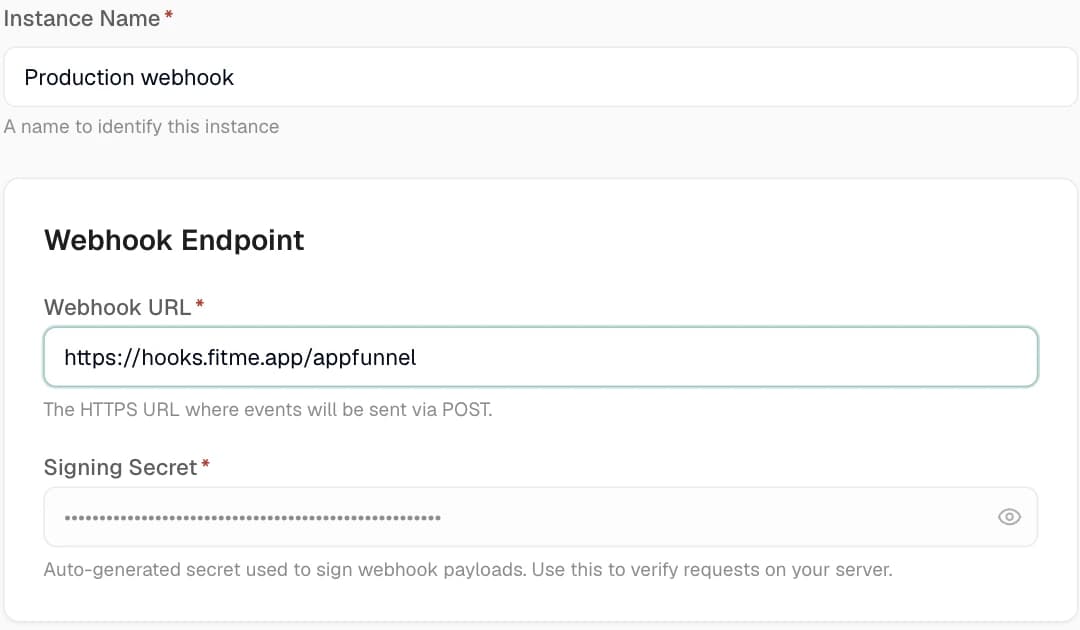
The Webhook integration sends event data to any HTTPS endpoint with signed payloads and automatic retries. Install it like any integration and configure:
webhookUrl— HTTPS only. A plain-HTTP URL is rejected:Webhook URL must use HTTPS.signingSecret— auto-generated (whsec_…), used to sign every delivery.subscribedEvents— which events to send.customHeadersand atimeout.
The eleven event types
You can subscribe to:
page.view · user.registered · checkout.start · checkout.payment_added · purchase.complete · customer.first_purchase · subscription.created · subscription.trial_started · subscription.trial_converted · subscription.renewal · marketing.consent_given
A subscription’s life shows up as three separate events, so you can tell winning a customer apart
from keeping one: subscription.trial_started when the trial begins, subscription.trial_converted
when it collects its first real payment, and subscription.renewal on every billing cycle after
that. Each carries the amount actually charged — zero for a free trial, the trial fee for a paid one.
Signed payloads
Each delivery is a POST carrying three headers:
| Header | Meaning |
|---|---|
X-Appfunnel-Signature | HMAC of the raw body, keyed by your signingSecret. |
X-Appfunnel-Event | The event type. |
X-Appfunnel-Event-Id | Unique id for the delivery (use it to dedupe). |
Verify the signature on your side before trusting a payload. Compute the HMAC over the raw request body with your signing secret and compare it to the header:
import { createHmac, timingSafeEqual } from 'node:crypto'

function verify(rawBody: string, signatureHeader: string, secret: string) {
	const expected = createHmac('sha256', secret).update(rawBody).digest('hex')
	const a = Buffer.from(expected)
	const b = Buffer.from(signatureHeader)
	return a.length === b.length && timingSafeEqual(a, b)
}
Always hash the exact bytes you received — parsing and re-serializing the JSON first will change the bytes and break verification. Deliveries are queue-backed and retried up to 5 times with exponential backoff. A non-2xx response (Webhook returned status <n>) or a timeout (Webhook request timed out after <ms>ms) triggers a retry.
These outbound webhooks fire from the Integrations catalog — there is no separate webhooks settings page. The inbound webhook/stripe, webhook/paddle endpoints are payment-provider ingestion and are unrelated to these customer-configurable event webhooks.
Visitors and customers
A visitor starts out anonymous. The moment they enter their email, Appfunnel turns them into a known customer — and if that email already exists in your project, it’s the same customer, not a new one. That’s the join that ties an anonymous ad click to a paying customer across your analytics and webhooks, so you always know which traffic actually converts.
Test-mode and preview traffic never reaches analytics. Only real live traffic shows up in your numbers — so QA runs don’t pollute them.
Tracking events
Your funnel emits a fixed set of events automatically — you don’t fire these:
funnel.start · page.view · page.exit · user.registered · experiment.exposure · checkout.start · checkout.payment_added · checkout.failed · purchase.complete · subscription.created · subscription.trial_started
A couple of behaviors worth knowing:
- Writing a non-empty
user.emailidentifies the visitor — a bound email input is the capture step; there’s no explicit “capture email” call. - Setting a
responses.*value does not emit a discrete event, so don’t rely on one for tracking — useuseTracker()below if you need a custom event.
For funnel-specific events, use the useTracker() escape hatch:
import { useTracker } from '@appfunnel-dev/sdk'

function QuizStep() {
	const { track } = useTracker()
	return <button onClick={() => track('quiz_skipped', { step: 3 })}>Skip</button>
}
The window.appfunnel bus
Every one of these events is also available on a client-side bus at window.appfunnel, so a script on your page can react to them. It gives you on/off to subscribe (a late-loading pixel still catches earlier events), read-only getters (getVariable, getVariables, getCurrentPageId, getCustomerId, getVisitorId), and navigation (goTo, goNext, goPrevious). It’s read-only by design — a page script can observe and navigate, but can’t fire events or change funnel state. The full surface is in the runtime API reference.